Steam Page Optimisation: Why You Need it for Your Game
A brief summary:
- Website's want to optimise for Google.
- Steam pages want to optimise for, yep, Steam's internal search functions.
- Keywords on a business website are query-focused.
- Keywords on Steam are more about tags.
- Steam pages are largely about the visuals: capsule image, screenshots, etc.
- However, content on your game's store page is still important.
Steam pages vs websites

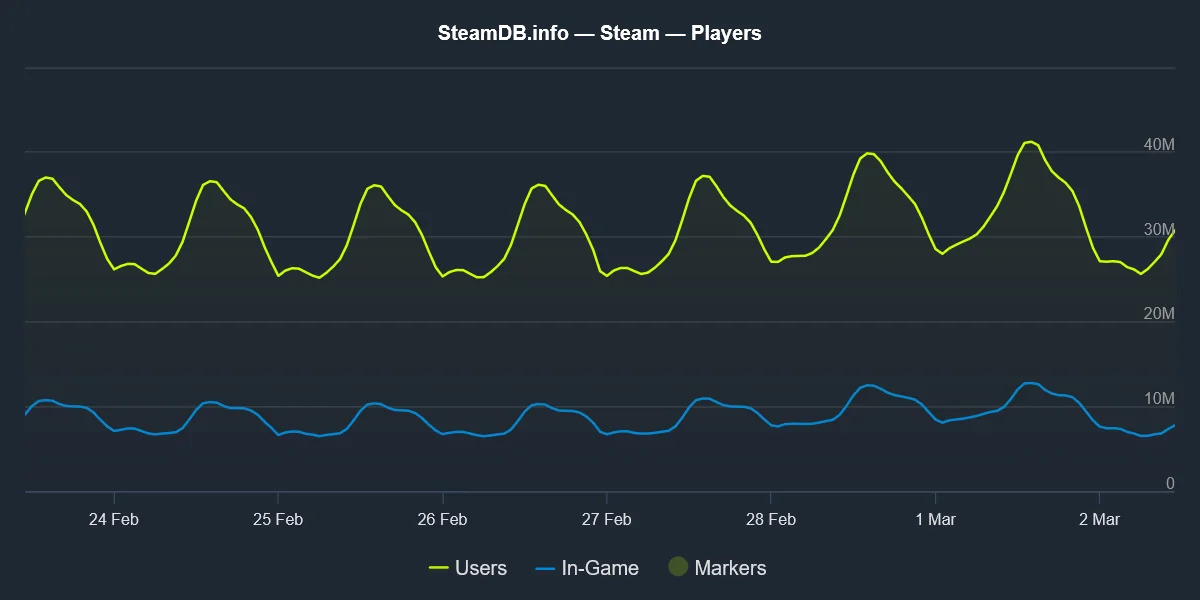
There's no denying that Steam is the final word when it comes to getting your PC game noticed. According to recent data from SteamDB, there are over 31,000,000 concurrent players logged into the platform as of this post going live.
In the last two months, it peaked at just over 42,000,000 players. That's more than the population of Canada.
That's a lot of people on one platform, so it's hardly a surprise that studios and developers (both indie and AAA) want to make sure they get noticed on Steam.
It's one thing to have a business website that ticks as many SEO boxes as possible. It's quite another to have a well-optimised Steam page that allows the platform, and its userbase, to find your game and (hopefully) wishlist it.
Now, if you're part of an indie studio or small development team and you're preparing to launch a new game, there's a good chance you have both a website and a Steam page.
However, what you do on one is not necessarily what you would do on the other in terms of overall optimisation, even if the intended outcome (visibility and discoverability) is the same.
You might have a blog on your website that outlines updates to an upcoming project or you're about to attend an event.
The way you utilise SEO tactics, such as through long form keywords, page structure, H2 and H3 tags, links, and image alt tags is all about getting you noticed on Google.
But your Steam page doesn't work like that. You're not trying to appeal to Google with your actual game's store page. You're trying to get more gamers to take an interest in your releases, upcoming and already out.
For starters, Steam has its own internal search function which operates differently. While Google is focussed on keyword usage and backlinks, Steam is more concerned with tag distribution, visual appeal, and wishlists.
If you have a look at Steam's Documentation, under "Key Visibility Elements," one of the biggest factors (at least this seems to be case, given that it's at the top) is tags.
What are Steam tags? In a nutshell, they are the short descriptions that categorise your game, be it multiplayer, horror, FPS, indie, adventure, etc.
Tags are functionally different to traditional search keywords, which (these days, at least) aim to answer user queries.
Relevant tags are vital for your game because, as the documentation itself says, they help Steam "determine where your game should be displayed to customers."
You want people to find your games directly on the Steam platform, and tags are one of the most important ways of doing so.
One piece of advice, according to Slash Skill, is to "be specific, not broad" and to make sure your five biggest tags are the first thing viewers see.
To summarise, then: websites aim to appeal to Google and other traditional search engines through keywords that answer queries, backlinks, and structure, while game pages on Steam – launched roughly 6-12 months before a title's release – want to make sure the platform can promote you to potential buyers
Visuals are vital on Steam
Capsule image
If you're a gamer (presumably you are, if you're reading this as a game developer yourself), then you're already aware that one of the first things you notice on Steam, whether it's an individual page or the storefront itself, is the visuals.
This is no coincidence.
Video games are primarily a form of visual entertainment. Even now, reviewers are not above discussing graphics and visuals, despite gameplay elements being arguably the most important aspect.
Given this, it's hardly surprising that Steam puts a lot of emphasis on the visual elements of a game's page.
According to a report from Wild Forest Studio, posted on November 2025, the "capsule image" (the header image that you see at the top of every store page) accounts for "90% of impressions." It's that important.
When it comes to your own Steam page, this is probably one of the first optimisations you'll need to make. Some general tips:
- Remember your capsule image is small.
- It shouldn't be overly busy.
- If your game has a distinct style, lean into it.
- Text is fine, but keep it minimal – ideally, the logo or just one or two words that can be easily read at small sizes.
Steam Page Analyzer goes over some sage advice when it comes to your capsule image.
Screenshots and trailers
Where would games be without screenshots and trailers? They're the thing that probably generates the most hype.
There's even an argument to be made that people will be more interested in what your game looks like rather than a written description of it (more on that further down).
I've been a gamer for as long as I can remember – I even worked as a freelance writer for a number of websites – and I know how germane it is to be able to see, in both picture form and via teasers/trailers, exactly what something is going to look and play like.
As part of your Steam page optimisation tactics, you need to be showcasing the actual game itself. I know, this sounds like a preaching-to-the-choir piece of advice, but it's worth mentioning, because you're not just throwing any old image or video out there.
Your screenshots aim to showcase the visuals, but they also need to give players an idea of what the gameplay will be like. As such, you need a variety of images on your page, perhaps showing different screens (menus and the UI, a typical map or level, skill trees, etc.).
Similarly, as with any means of gaining traction in terms of discoverability, you want to be grabbing attentions as soon as possible.
In an ideal setting, your main trailer – the one that all the press is going to be using – should be loading first. Make sure it's not too long, some recommend they be between 30-seconds and around three minutes, depending on what you're showing.
Again, to summarise: Steam page optimisation is largely about capturing people's attention early with visuals and trailers that spell out what the game will look and feel like. It's arguably the most vital thing when it comes to the page itself. However...
Steam page content is still important

So, you've got an eye-catching capsule image that's got people clicking onto your Steam page, and your trailer is borderline mouthwatering in its ability to tease the viewer. Also, look at them tags, baby! Everyone knows where your upcoming release belongs in the game-o-sphere (for 'tis a thing).
Right. Now we just some content.
Look, as a writer looking to help businesses with their content, it would be remiss of me to not put emphasis on the importance of the actual words on your game page. I can already sense that you might not be thinking it's of any use to you now.
You've got the visual aspects of your Steam page down to a fine art. What else could there be?
Well, you still need your actual description.
Screenshots and the like are how you get people in. However, they only tell a portion of the story. A big portion, admittedly, but there's still work to be done. This is where the content comes into play.
You need to make sure your page is converting casual browsers into buyers or people who add your game to their wishlist. That's where you want to be and a good game description finishes this off.
Are you looking to optimise the content in the same you would for a business website? Not really, no, but that doesn't mean you shouldn't put focus on it.
Your game description might not be interested in H2 and H3 tags or long form keyword usage, but it still carries a lot of weight. It's your chance to sell the game in ways that the images can't quite handle.
A story outline, bullet points that showcase the main gameplay features/mechanics, an elevator pitch that keeps people scrolling, etc. You're not looking to appease Google's ever-changing algorithm here, but you do need to make sure people understand what your game is about.
Finally, just before anyone leaves your Steam page, you need to slap a bow on that description, a call-to-action, something that gets people clicking "Add to Cart" or "Add to Wishlist." That's the end goal, is it not?
Speaking of CTAs, if you're an indie game developer and you would like some assistance optimising your Steam page, get in touch or check out my Indie Game Studio Package (see, just like that).
0 Comments Add a Comment?